For the best experience, use Edge, Chrome, Safari, or Firefox on desktop browsers. On mobile devices, Chrome is recommended.
This guide provides standardized operating instructions for users of the DynoDB molecular dynamics database. It covers the homepage retrieval logic, parameter configuration for the three core search modes, and interpretation standards for metadata and molecular dynamics plots on entry detail pages.
1. DynoDB Homepage
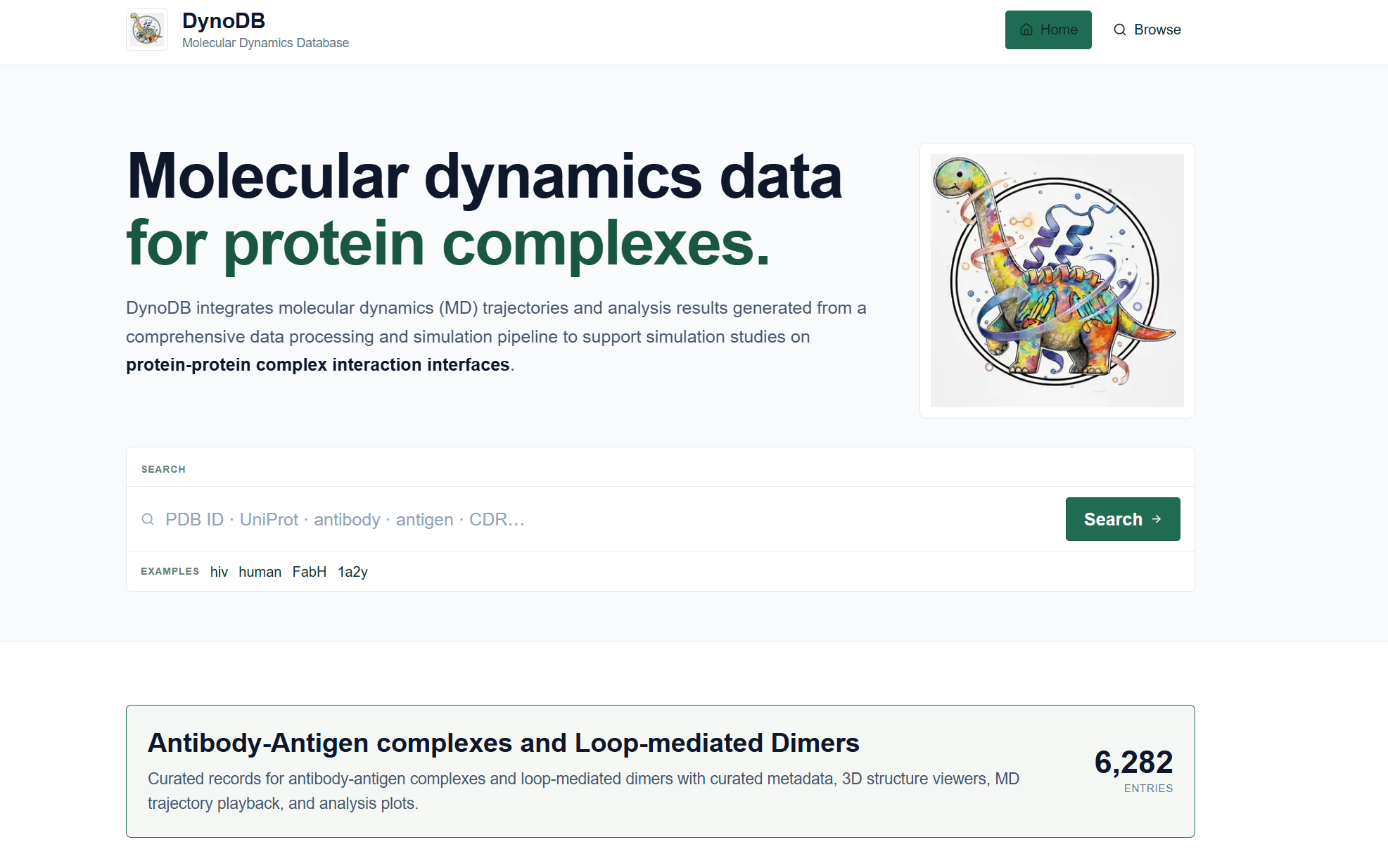
The core datasets currently presented on the DynoDB homepage are Antibody-Antigen Complexes and Loop-mediated Dimers, comprising 6,282 records in total. The dataset integrates three-dimensional structural metadata, molecular dynamics (MD) trajectories, and analytical metrics for the complexes.
Users can enter keywords such as PDB IDs (e.g., 1A2Y), UniProt accession numbers, antibody or antigen names, organism classifications, or CDR sequences in the homepage search box to initiate a global match and proceed to the Browse search interface.
Figure 1. Current DynoDB homepage: search box, example queries, and dataset-size display.
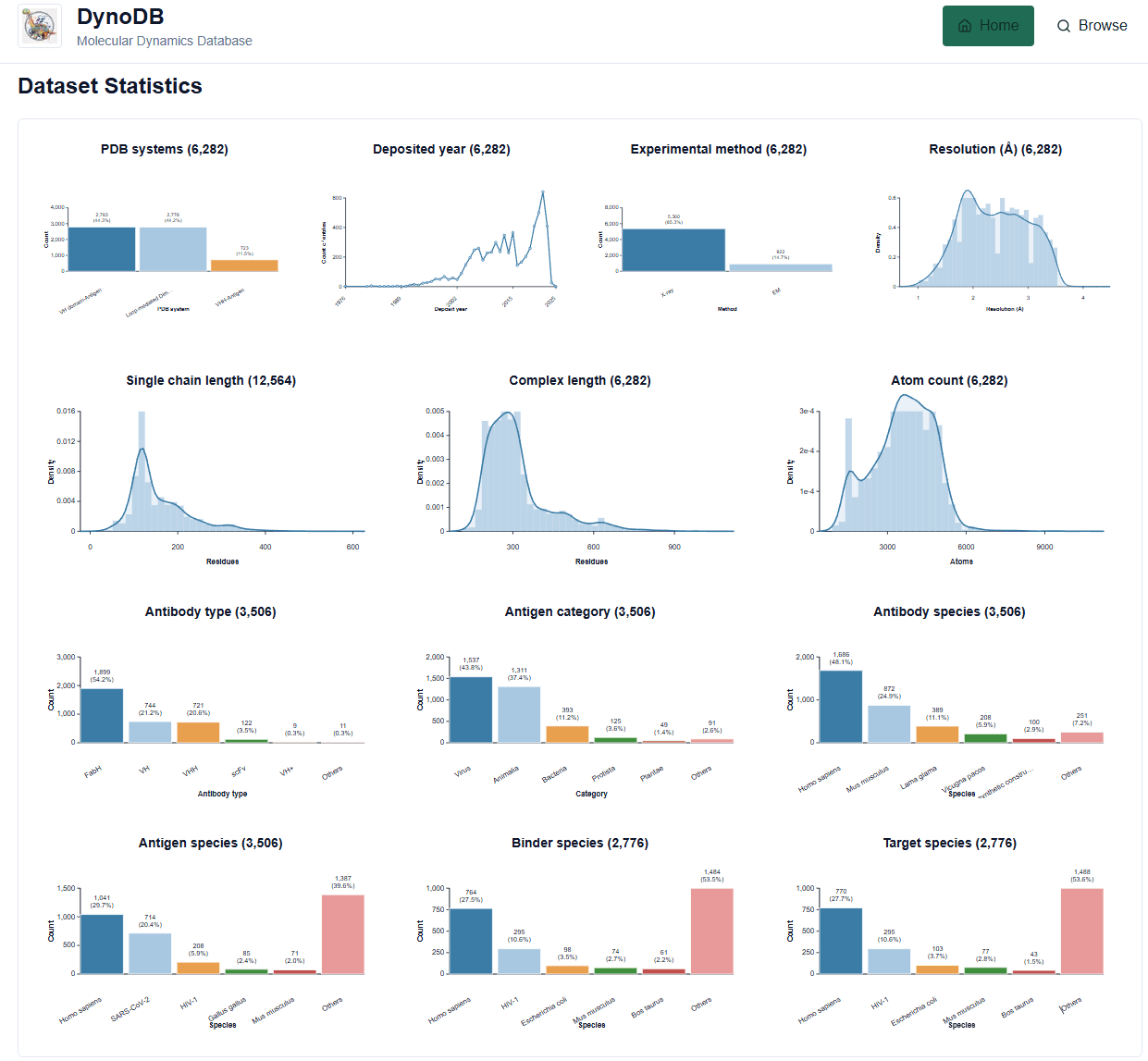
The homepage also provides a dataset overview to help users determine whether the database covers their research objects of interest. Key statistics include simulated system type, release date of experimental crystal structures, experimental method, resolution, single-chain length, complex size, atom count per system, antibody type, antigen category, antibody organism, antigen organism, binder organism (the chain containing a loop at the interaction interface), and target organism (the chain bound by the binder).
Figure 2. Dataset statistics.
2. DynoDB Search Page
The left navigation bar provides three search modes. Their applicable use cases and underlying logic are summarized below.
Search Mode
Applicable Data Source
System Operation and Evaluation Metrics
Metadata Search
Structured data such as PDB ID, organism, experimental method, and antibody/antigen category
Performs Boolean filtering based on database fields. Select the target System accurately to load the corresponding field set.
Sequence Similarity
Amino acid sequence text (FASTA format supported)
Uses the BLASTP algorithm. Evaluation should focus on Identity, Query Coverage, and E-value.
Structure Similarity
PDB coordinate text or a local PDB structure file
Uses the Foldseek algorithm. Global structural matching should be evaluated using TM-score together with Target/Query Coverage.
2.1 Metadata Search
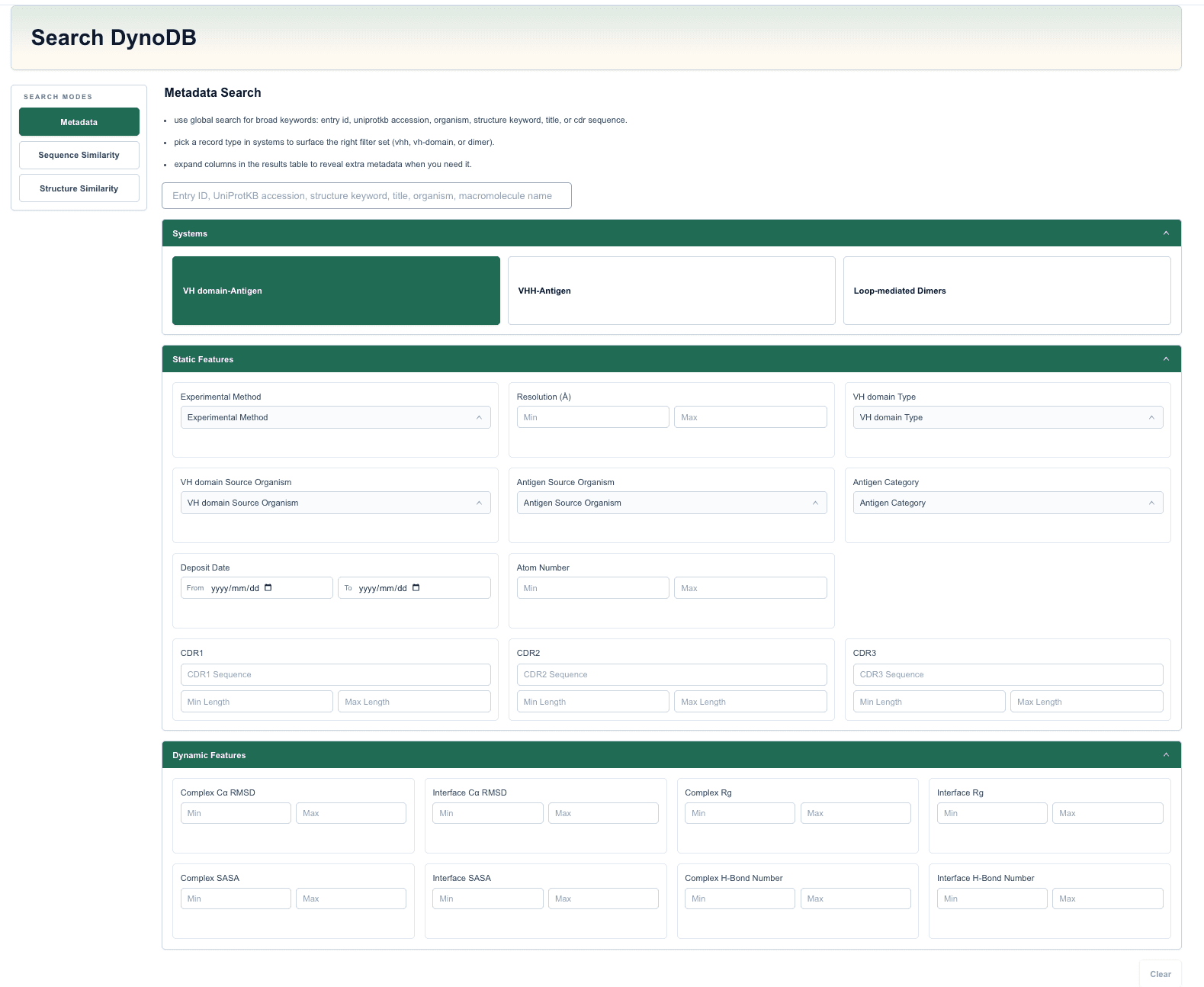
In Metadata search mode, the global search box at the top of the page supports keyword matching across multiple dimensions, including Entry ID, UniProtKB accession number, Organism, Structure keyword, Title, CDR sequence, and Macromolecule name.
In addition, the search panel provides three groups of filters: System, Static Features, and Dynamic Features. The selected System determines the field-mapping logic used by the search panel. Operating guidelines are as follows.
VH domain-Antigen
This category applies to complex systems in which a conventional antibody heavy-chain variable domain or Fab fragment binds an antigen. After this category is selected, the system provides dedicated search fields such as VH domain Macromolecular Name and Antigen Category.
VHH-Antigen
This category is designed for systems containing nanobodies or single-domain antibodies. It provides search fields such as VHH Macromolecular Name.
Loop-mediated Dimers
This category applies to conventional dimeric systems that are not antibody-antigen complexes. After this category is selected, antibody-specific search criteria are disabled; the core search fields instead center on Binder Macromolecular Name and Target Macromolecular Name.
Figure 3. Metadata search.
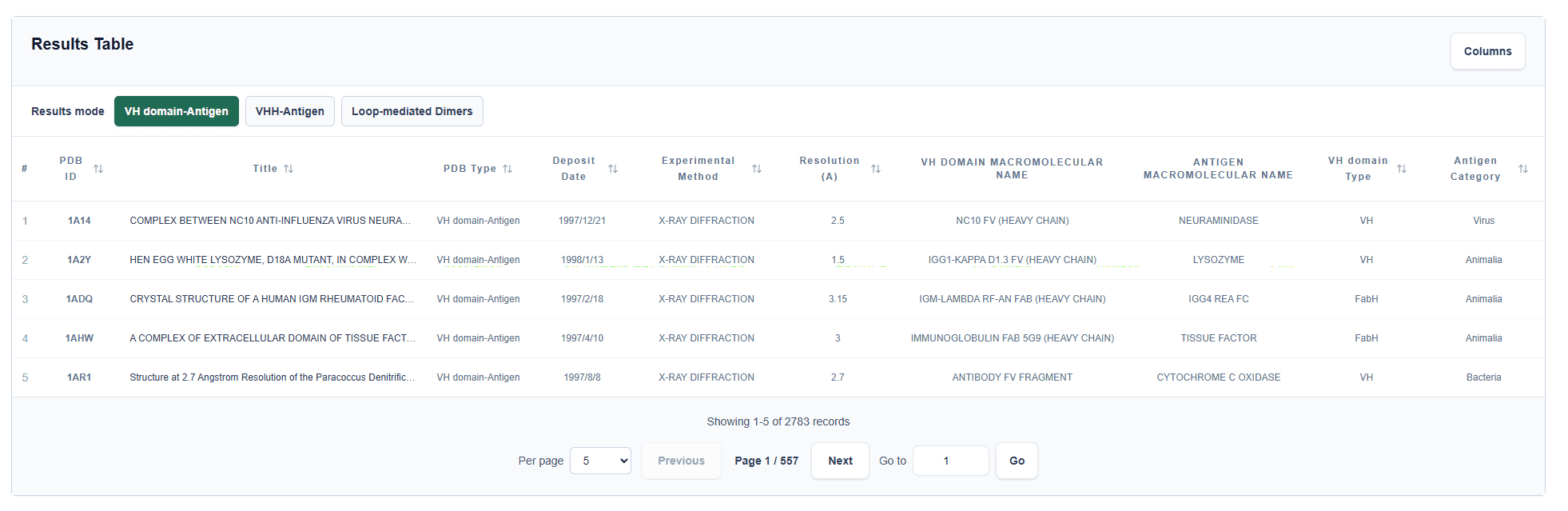
The page also provides a Results Table.
2.2 Sequence Similarity Search
This module performs homology searches based on amino acid sequence alignment and uses the BLASTP algorithm in the backend. The operating and data-processing rules are as follows.
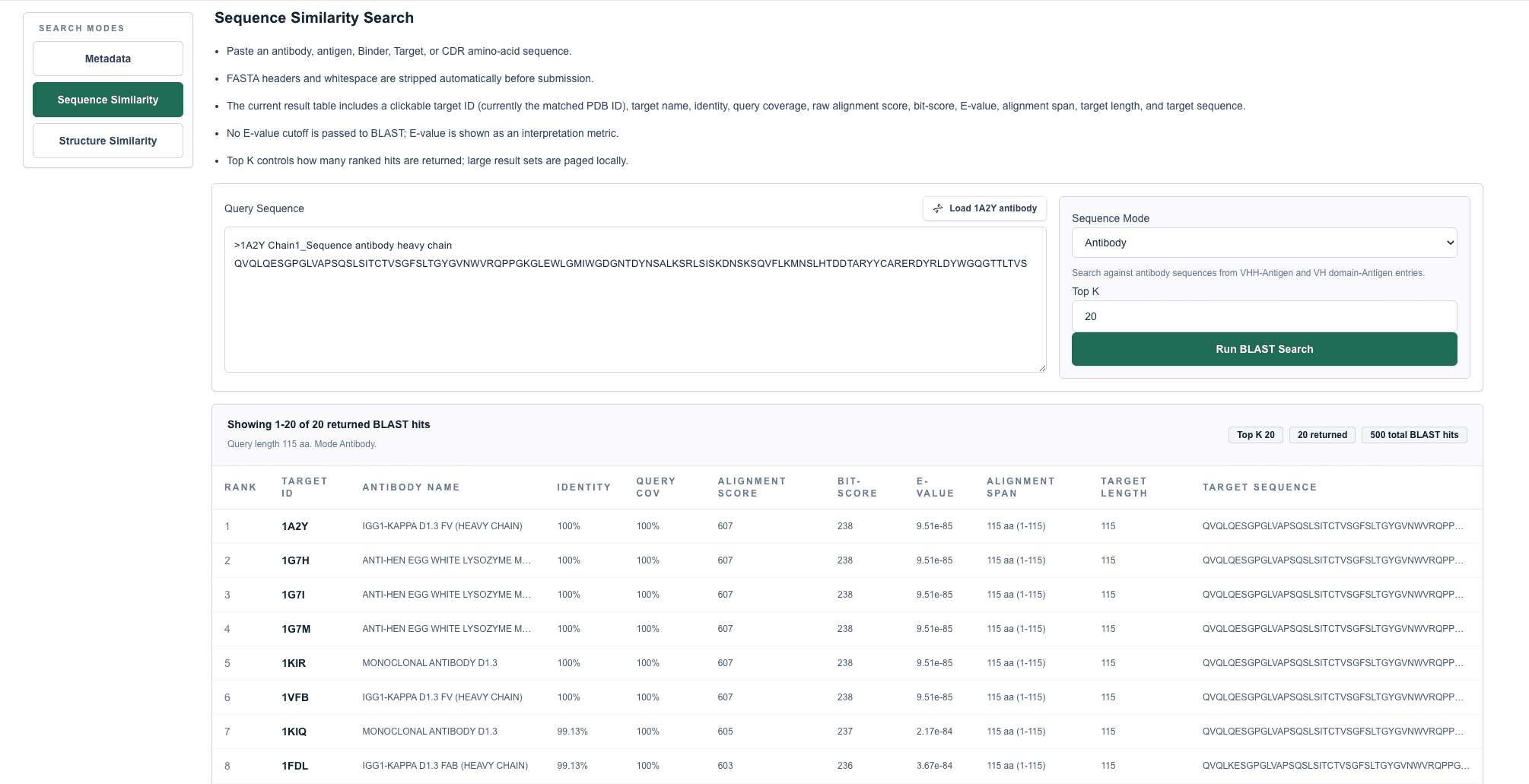
Input requirements: The system supports direct input of amino acid sequence text for VHH, VH domain, antigen, Loop-mediated Dimer, or CDR regions. If the input contains FASTA headers or whitespace characters, the system automatically removes and sanitizes them before submission.
Sequence Mode: The user must explicitly specify the sequence type to be searched against, such as Antibody, Antigen, Binder, Target, or a specific CDR region.
Top K: The user can set the desired maximum number of hits to retrieve. To ensure system performance and result relevance, the returned result set is capped at 100 hits.
Backend filtering criterion: Before ranking and display, the system automatically removes matches with E-value >= 0.001 and retains only BLASTP hits with strong statistical significance.
Result-evaluation metrics: The results table reports Target ID, Identity, Query Coverage, Raw alignment score, Bit-score, E-value, and Alignment span. When evaluating sequence homology, users should consider identity and coverage values approaching 100%, together with an E-value approaching 0.
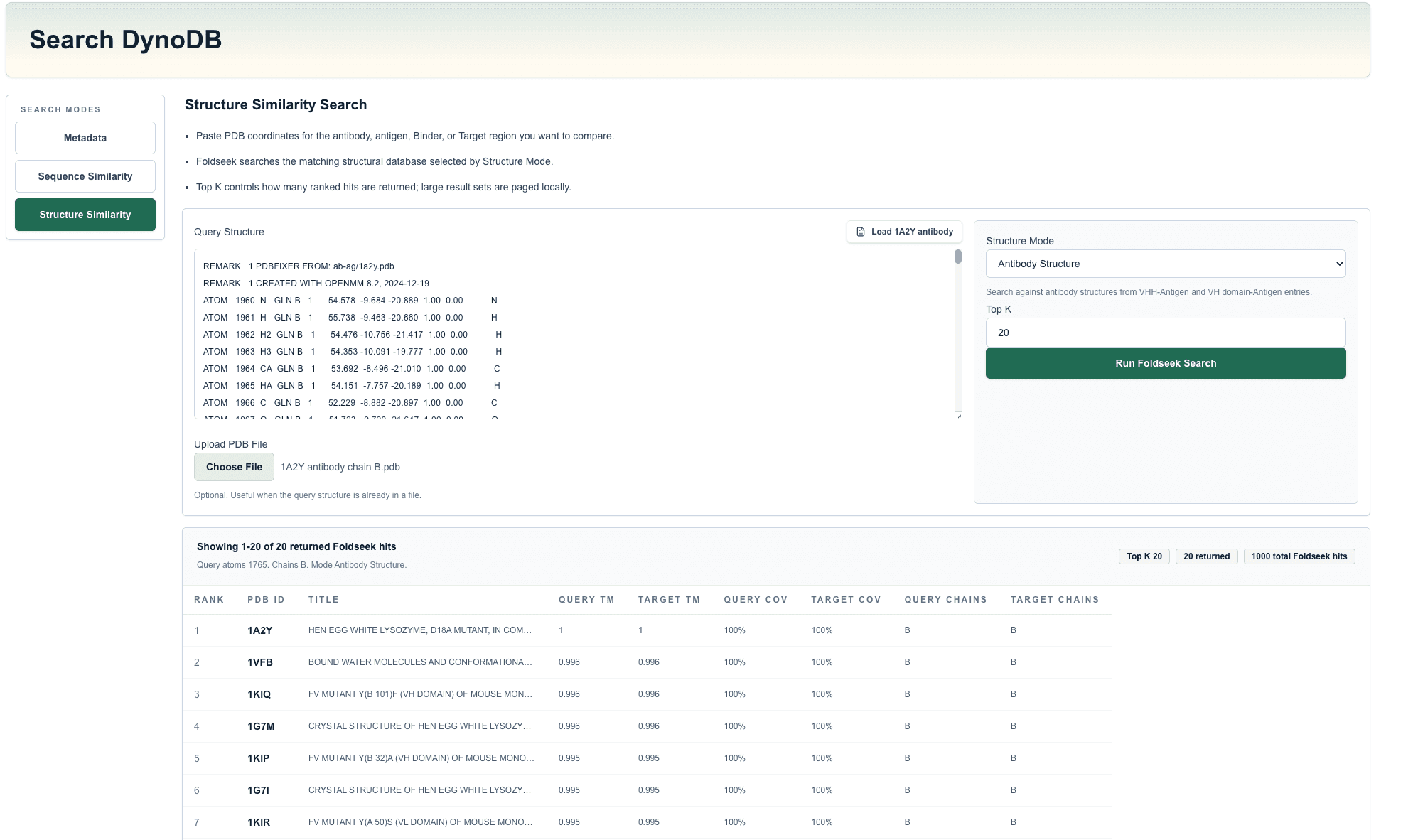
For example, click Load 1A2Y antibody and then run Run BLAST Search. The output shows 20 of 500 BLAST hits, a query length of 115 aa, and mode Antibody. The first result is:
Target ID
1A2Y
Antibody Name
IGG1-KAPPA D1.3 FV (HEAVY CHAIN)
Identity
100%
Query Coverage
100%
Alignment Score
607
Bit-score
238
E-value
9.51e-85
Alignment Span
115 aa (1-115)
Target Length
115
Figure 4. Sequence similarity search.
2.3 Structure Similarity Search
This module identifies matches based on three-dimensional spatial topology and uses the Foldseek algorithm in the backend. The operating and data-processing rules are as follows.
Input requirements: The system supports directly pasting standard PDB-format atomic coordinate text or uploading a local PDB structure file to initiate a search.
Structure Mode: The user must specify the relevant structural sub-library according to the exact input type. Available options include Antibody Structure, Antigen Structure, Binder Structure, and Target Structure.
Top K: As with sequence search, the maximum number of returned structure-search hits is capped at 100.
Result-evaluation metrics: The system outputs alignment results including Query TM-score, Target TM-score, Query Coverage, and Target Coverage.
Interpretation standard: Structural similarity must be assessed from a global perspective. A single local fragment may produce a high local score but has limited reference value. A high-confidence structural match must combine a high TM-score (the theoretical maximum is 1) with sufficient bidirectional Query/Target Coverage.
For example, click Load 1A2Y structure and then run Run Foldseek Search. The output shows 20 of 1000 Foldseek hits, 3,723 query atoms, query chains C and B, and mode Antibody Structure. The first result is:
PDB ID
1A2Y
Title
HEN EGG WHITE LYSOZYME, D18A MUTANT, IN COMPLEX WITH MOUSE MONOCLONAL ANTIBODY D1.3
Query TM-score
1
Target TM-score
1
Query Coverage
100%
Target Coverage
100%
Query Chains
C, B
Target Chains
B
Figure 5. Structure similarity search.
2.4 Results Table
The Results Table displays records that match the current search criteria. The PDB ID can be clicked to open the detail page; Columns expands additional fields; page-size and pagination controls are used to browse large result sets. For the 1a2y query, the current result includes:
Figure 6. Results table.
PDB ID
1A2Y
PDB Type
VH domain-Antigen
Title
HEN EGG WHITE LYSOZYME, D18A MUTANT, IN COMPLEX WITH MOUSE MONOCLONAL ANTIBODY D1.3
Deposit Date
1998/1/13
Experimental Method
X-RAY DIFFRACTION
Resolution
1.5 Å
VH domain Macromolecular Name
IGG1-KAPPA D1.3 FV (HEAVY CHAIN)
Antigen Macromolecular Name
LYSOZYME
VH/VHH Type
VH
Antigen Category
Animalia
3. DynoDB Details Page
The DynoDB Details Page presents static structural information, trajectory-derived dynamic features, interfacial interactions, and binding-energy analysis results for an individual molecular dynamics simulation system. Users can access this page by clicking the PDB ID or the Details button for an entry on the search results page.
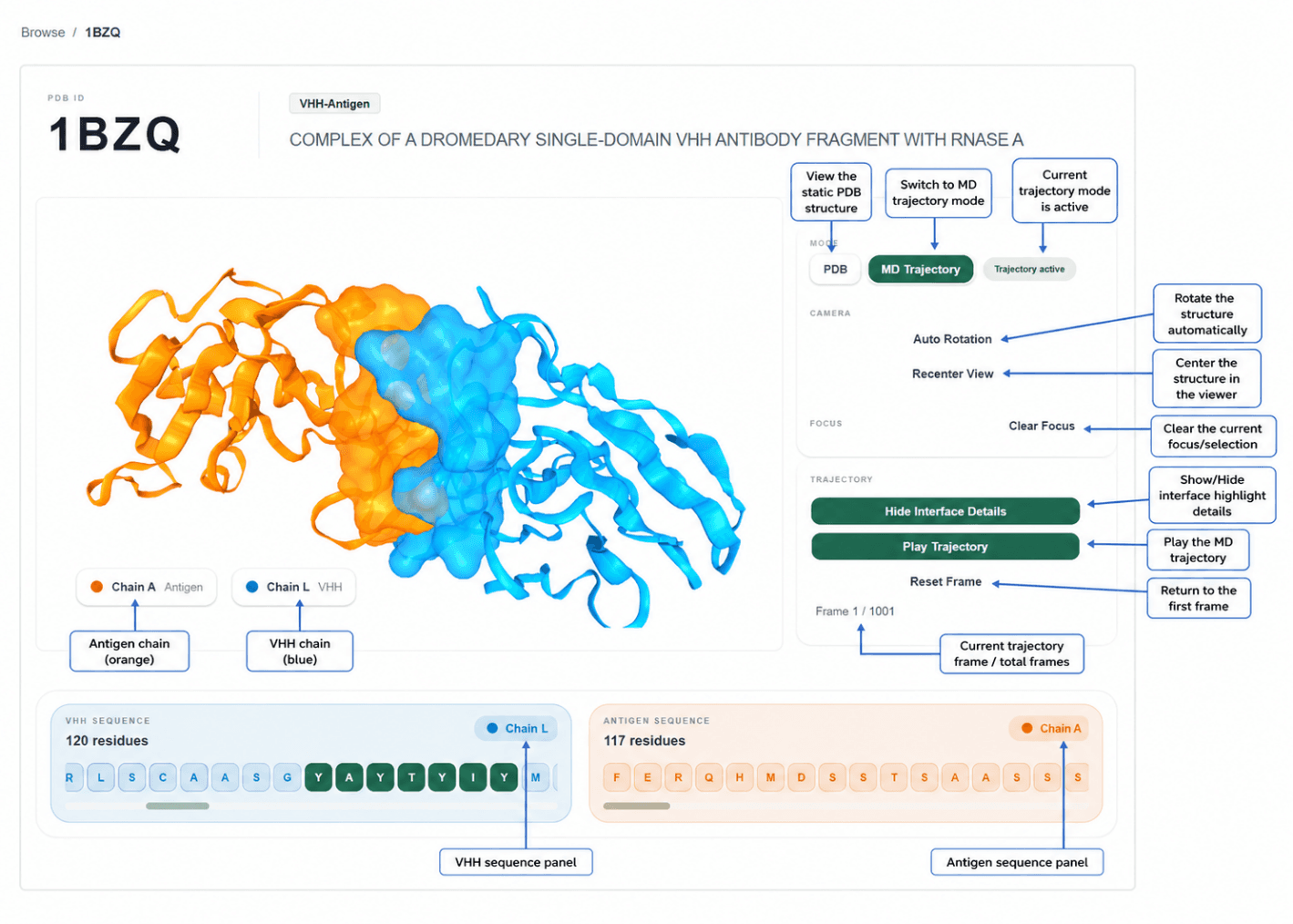
The page title uses the entry ID, such as 1BZQ in the figure. From top to bottom, the page includes structure visualization, static annotations, global and local dynamic features, interface dynamic features, energy landscape and binding energetics.
3.1 Entry Metadata and 3D Structure Visualization
The top of the page displays basic entry identifiers, including the PDB ID, entry name, and system type.
(1) 3D Structure and Dynamic Trajectory Viewer
The left panel provides a 3D visualization of the complex. Users can view the initial static structure and also play or inspect the molecular dynamics trajectory to observe conformational changes and interfacial dynamic behavior during the simulation. Different molecular components are distinguished by color, such as antibody and antigen components, or the two chains in Loop-mediated Dimers.
Instructions
View the static structure: the initial conformation of the system is shown by default and can be used to inspect the overall complex architecture, chain distribution, and binding interface.
Play or pause the dynamic trajectory: use the trajectory playback control in the viewer to inspect time-ordered conformational changes of the protein complex during the simulation. Playback can also be paused using Pause Trajectory.
Rotate the structure: press and hold the left mouse button within the 3D structure area and drag.
Zoom the structure: use the mouse wheel to zoom in or out.
Translate the structure: drag the structure according to the viewer controls to adjust the viewing angle.
Identify different chains or molecular components: use the color legend below the structure to distinguish the antibody, antigen, Binder, Target, or other structural components.
Focus on the interface region: use the interface display or chain-selection functions to examine the binding region between the two molecular partners and its changes along the trajectory.
Locate specific residues: select residues in the sequence track below and inspect their corresponding spatial positions and local conformational changes in the 3D structure or trajectory.
Recommended use
When viewing the static structure, quickly confirm the overall binding mode and chain composition of the complex.
During trajectory playback, focus on whether the antibody CDR regions, antigen epitopes, Loop-mediated Dimers interface, and residues near key sites undergo noticeable motion.
For interface-stability analysis, interpret this view together with downstream i-RMSD, contact frequency maps, and noncovalent-interaction results.
(2) Chain Sequences and Residue Localization
The amino acid sequences of all chains in the system are shown below the structure viewer. The sequence colors correspond to the chains or molecular components in the 3D structure.
Instructions
Browse the residue composition and numbering of different chains in the sequence track.
Click or select a specific residue to locate its spatial position in the 3D structure.
During trajectory playback, observe time-dependent conformational changes of specific residues or local regions.
For Antibody-Antigen systems, pay particular attention to the heavy chain, CDRH regions, and antigen epitope residues.
For Loop-mediated Dimers systems, compare the relative motion of the two chains and changes in interfacial contacts during the simulation.
Figure 7. Entry metadata, 3D structure viewer, dynamic trajectory viewer, and chain sequence track.
3.2 Static Features (Static Structure Annotation)
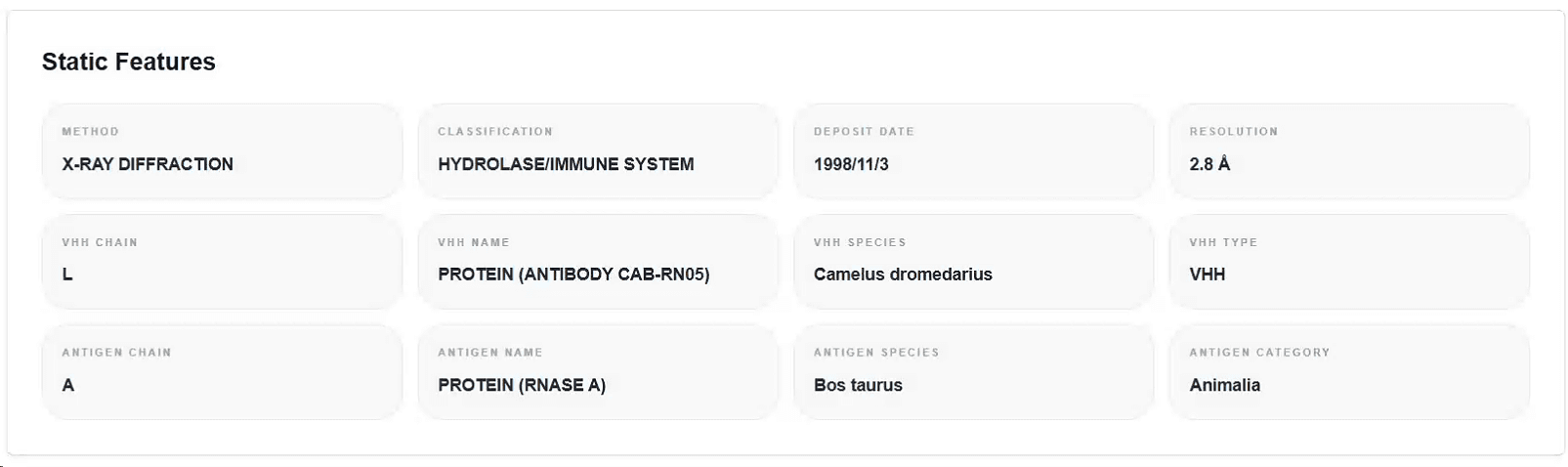
The Static Features module provides experimental structural information and biological background for the entry, helping users quickly understand the origin and composition of the system.
Common information includes
experimental structure-determination method
structure resolution
PDB deposition or release date
molecular name
source organism
chain composition and assignment
antibody type, antigen type, or protein category
structural classification and related functional annotations
Recommended use
Before performing dynamic analysis, review this module to confirm the identity and correspondence of each chain in the system.
For Antibody-Antigen complexes, first confirm the antibody chains, antigen chains, and CDRH annotations.
For Loop-mediated Dimers systems, first confirm the composition and functional types of the Binder and Target.
Figure 8. Static Features module for experimental and biological annotations.
3.3 Global and Local Dynamic Characteristics
This section evaluates the overall stability, local flexibility, correlated conformational motions, and secondary-structure changes of the system during the molecular dynamics simulation.
Depending on the system type, different component labels may be displayed, such as Overall, Antibody, Antigen, CDRH, Interface, Binder, or Target.
3.3.1 RMSD
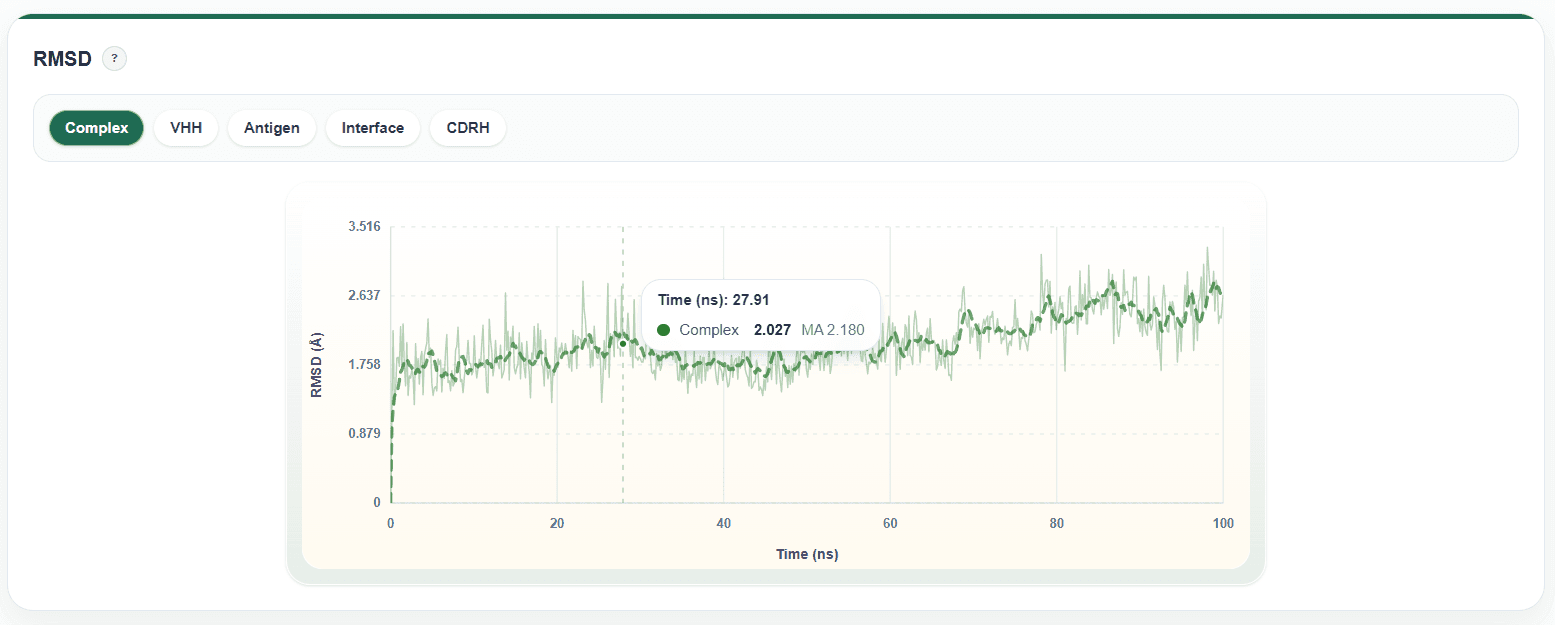
RMSD measures the deviation of the structure from the initial or reference conformation during the simulation.
Instructions
Select the object to inspect above the RMSD plot, such as the whole system, antibody, antigen, CDRH, or interface.
The x-axis usually represents simulation time, and the y-axis represents the RMSD value.
Hover over the curve to view the exact value at the corresponding time point.
Click a curve name in the legend to hide or show a specific data series.
Use the toolbar in the upper-right corner of the chart to zoom, pan, or restore the default view.
Interpretation
If RMSD stabilizes in the later stage of the simulation, the system has generally reached a relatively equilibrated state.
A continuously increasing RMSD or large fluctuations may indicate substantial conformational changes in the system.
Figure 9. RMSD module for global and local structural deviation over simulation time.
3.3.2 Radius of Gyration (Rg)
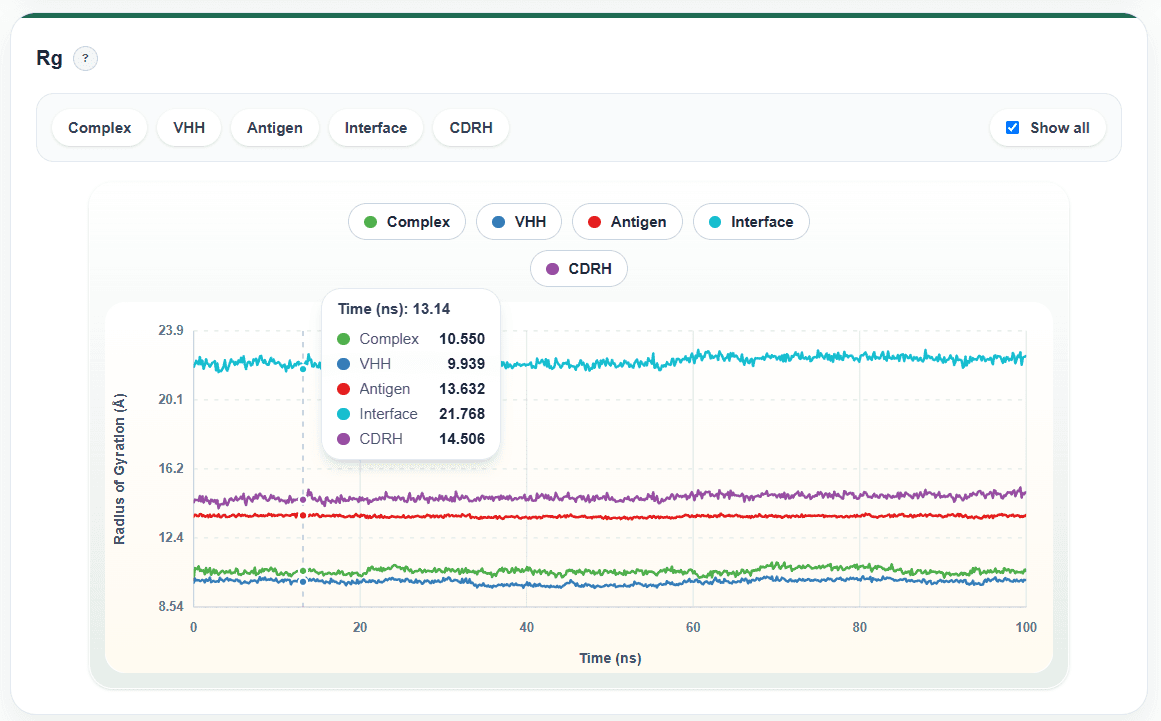
Rg describes the overall compactness of the protein system.
Instructions
Switch between different components using the tabs at the top of the chart.
Hover over the curve to view the Rg value at a specified time point.
Use the legend to show or hide curves for different components.
Interpretation
A relatively stable Rg indicates little change in the overall compactness of the system.
A continuously increasing Rg may suggest structural expansion or partial unfolding.
A continuously decreasing Rg may suggest a transition toward a more compact conformation.
Figure 10. Radius of Gyration (Rg) module for protein compactness analysis.
3.3.3 RMSF
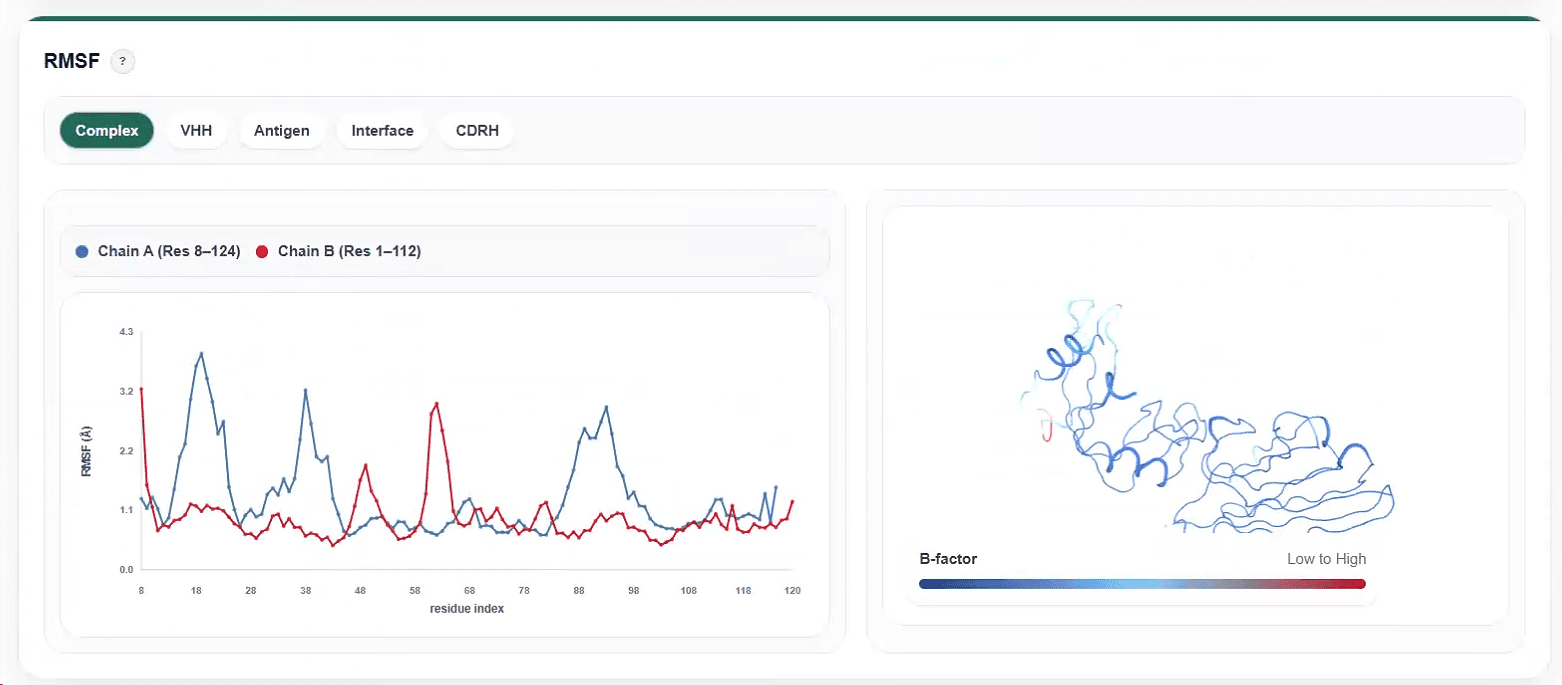
RMSF describes the flexibility or fluctuation amplitude of each residue during the simulation. This module usually includes a residue RMSF curve and a structure-mapping view.
Instructions
Select the structural component to inspect at the top of the module.
Use the RMSF curve to examine fluctuations at different residue positions.
Use the color-mapped structure to observe the spatial distribution of high- and low-flexibility residues in the 3D complex.
Hover over the curve or structure map to view the corresponding residue and numerical value.
Interpretation
Regions with higher RMSF usually correspond to flexible loops, terminal regions, or regions with large conformational changes.
Regions with lower RMSF usually correspond to stable secondary-structure cores.
Figure 11. RMSF module for residue-level flexibility and structure mapping.
3.3.4 DCCM
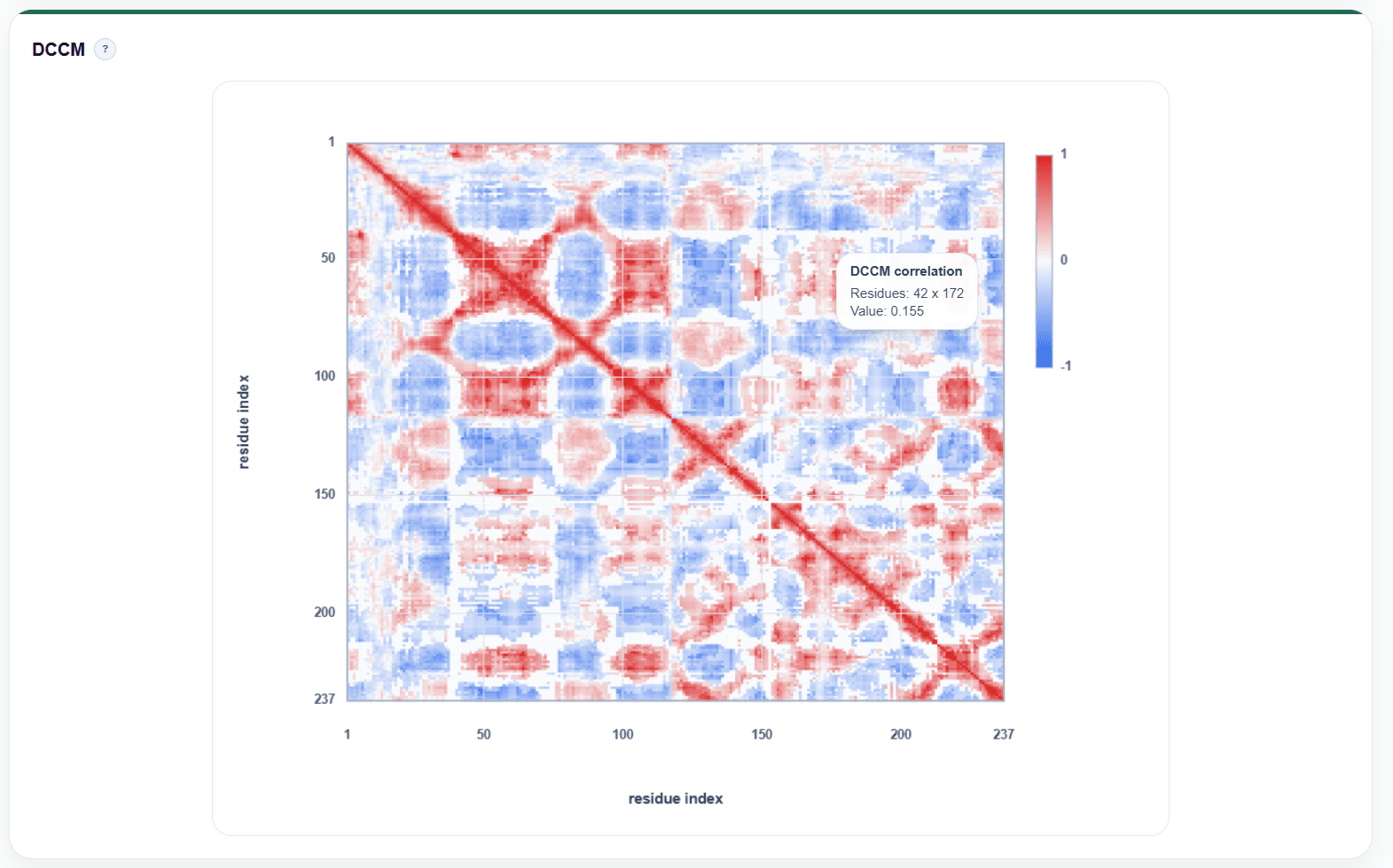
DCCM, the dynamic cross-correlation matrix, is used to analyze correlated motions between different residues.
Instructions
Both the x-axis and y-axis represent residue numbers.
Hover over a matrix cell to view the correlation for the corresponding residue pair.
Use the color bar to interpret the motion relationship between residues.
Interpretation
Red regions generally indicate positively correlated motion, meaning that the two residues tend to move in the same direction.
Blue regions generally indicate negatively correlated motion, meaning that the two residues tend to move in opposite directions.
White or light-colored regions indicate weak correlation.
Figure 12. DCCM module for correlated residue motions.
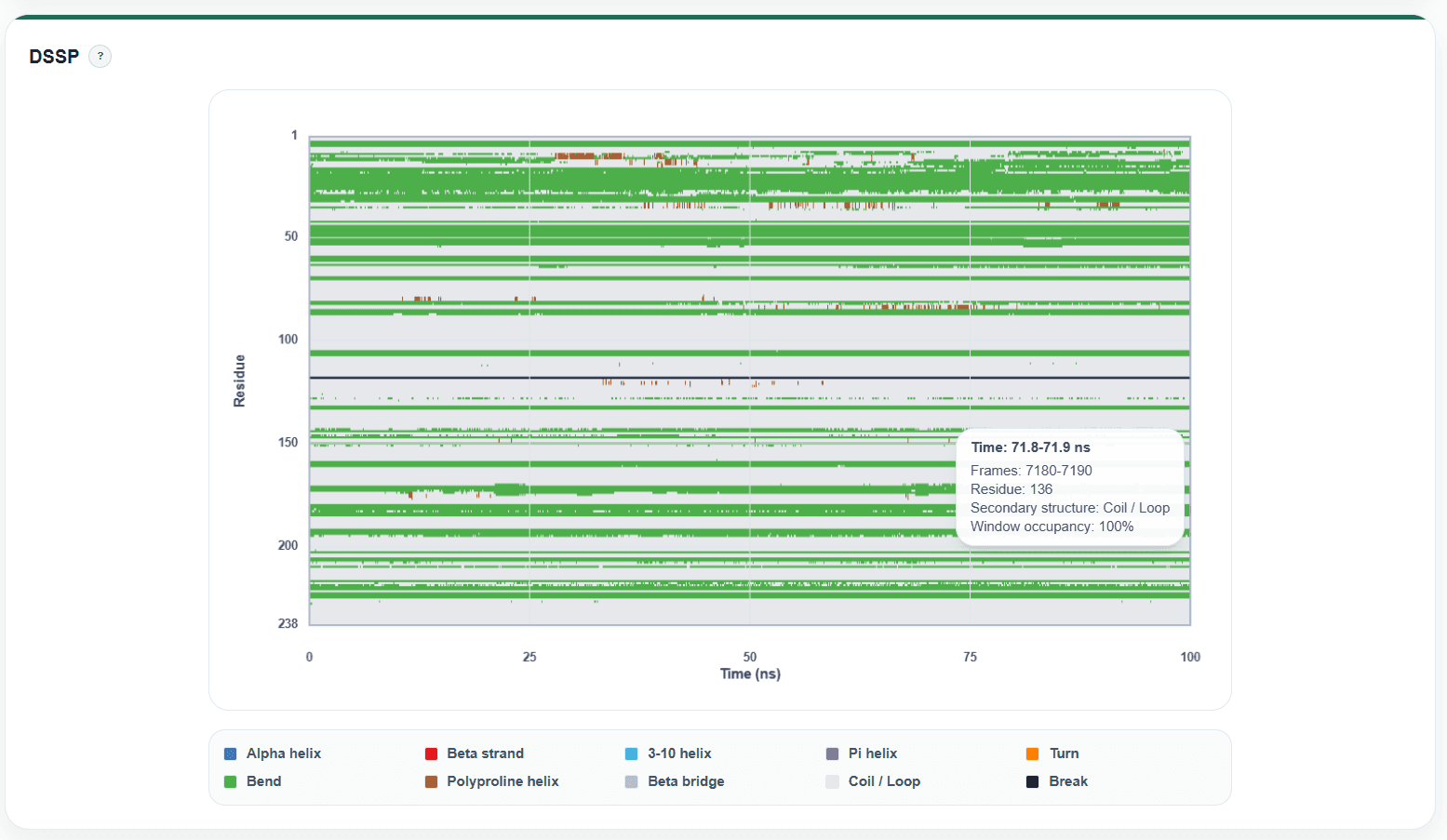
3.3.5 DSSP
The DSSP module displays changes in protein secondary structure over simulation time.
Instructions
The x-axis represents simulation time.
The y-axis represents residue number.
Different colors indicate different secondary-structure types, such as alpha-helix, beta-sheet, turn, or random coil.
Use the legend below the chart to confirm which secondary-structure category each color represents.
Interpretation
Large continuous and stable color regions usually indicate that the corresponding secondary structure is maintained.
Frequent color changes in a residue region suggest possible secondary-structure transitions or strong conformational fluctuations.
RMSF results can be used together with this module to determine whether highly flexible regions are accompanied by secondary-structure changes.
Figure 13. DSSP module for secondary-structure changes over simulation time.
3.4 Interface Dynamic Characteristics
This section analyzes interface stability, interaction changes, and residue contacts between the two molecular partners in the complex during the simulation.
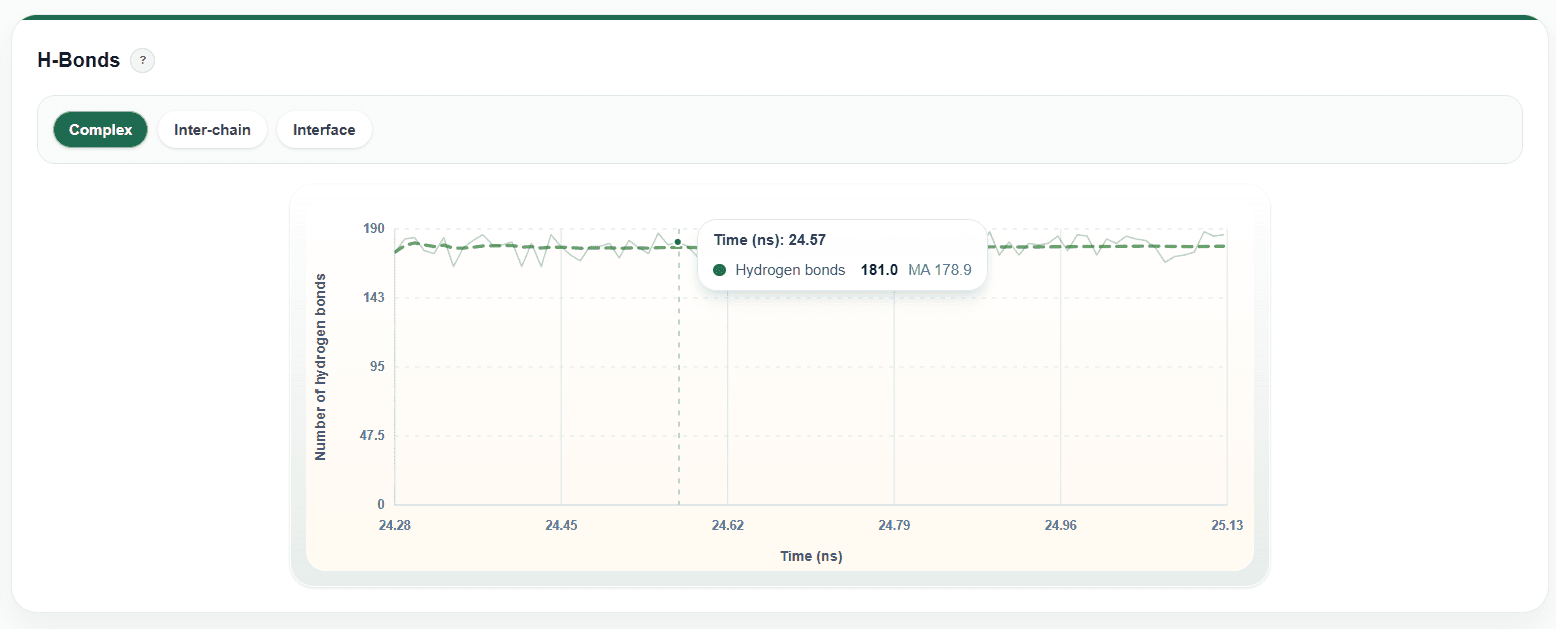
3.4.1 Interface Hbond (Interface Hydrogen Bonds)
The Interface Hbond module shows how the number of hydrogen bonds between the two molecular partners in the complex changes during the molecular dynamics simulation. This metric can be used to assess the stability of polar interactions at the interface and to help identify key hydrogen-bond networks that may maintain complex binding.
Instructions
The x-axis represents simulation time, and the y-axis represents the number of interface hydrogen bonds.
Hover over any point on the curve to view the number of interface hydrogen bonds at the corresponding time point.
Interpretation
If the number of interface hydrogen bonds remains relatively stable during the simulation, the polar interactions at the complex interface are generally stable.
A sustained decrease or pronounced large fluctuations in hydrogen-bond counts may indicate rearrangement, weakening, or loss of some interfacial interactions.
An increase in hydrogen-bond counts followed by stable maintenance may indicate that new stable interfacial interactions form during the simulation.
Figure 14. Interface Hbond module for hydrogen-bond count changes over time.
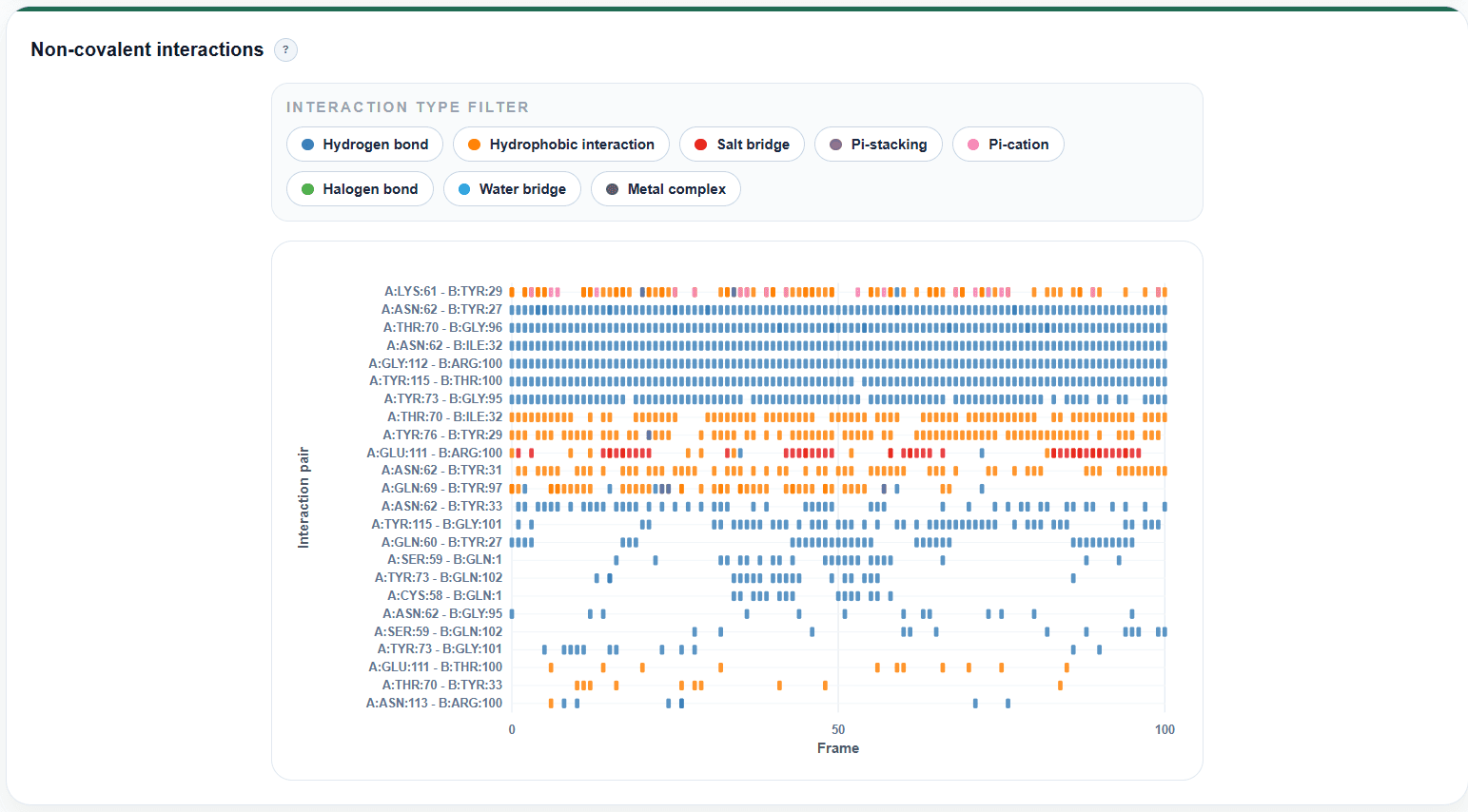
3.4.2 Noncovalent Interactions
This module displays the types, residue pairs, and occurrence patterns of noncovalent interactions at the interface during the simulation.
Includes
hydrogen bonds
hydrophobic interactions
salt bridges
pi-pi stacking
pi-cation interactions
halogen bonds
water bridges
metal coordination
Instructions
Use the legend to identify the interaction type represented by each color.
Interpretation
Persistent hydrogen bonds, salt bridges, or hydrophobic contacts usually suggest interactions that may be important for complex stability.
Interactions that appear only briefly at a small number of time points may represent transient contacts.
Key binding sites can be assessed in combination with the positions of the specific residues involved.
Figure 15. Noncovalent Interactions module for interface interaction types and residue pairs.
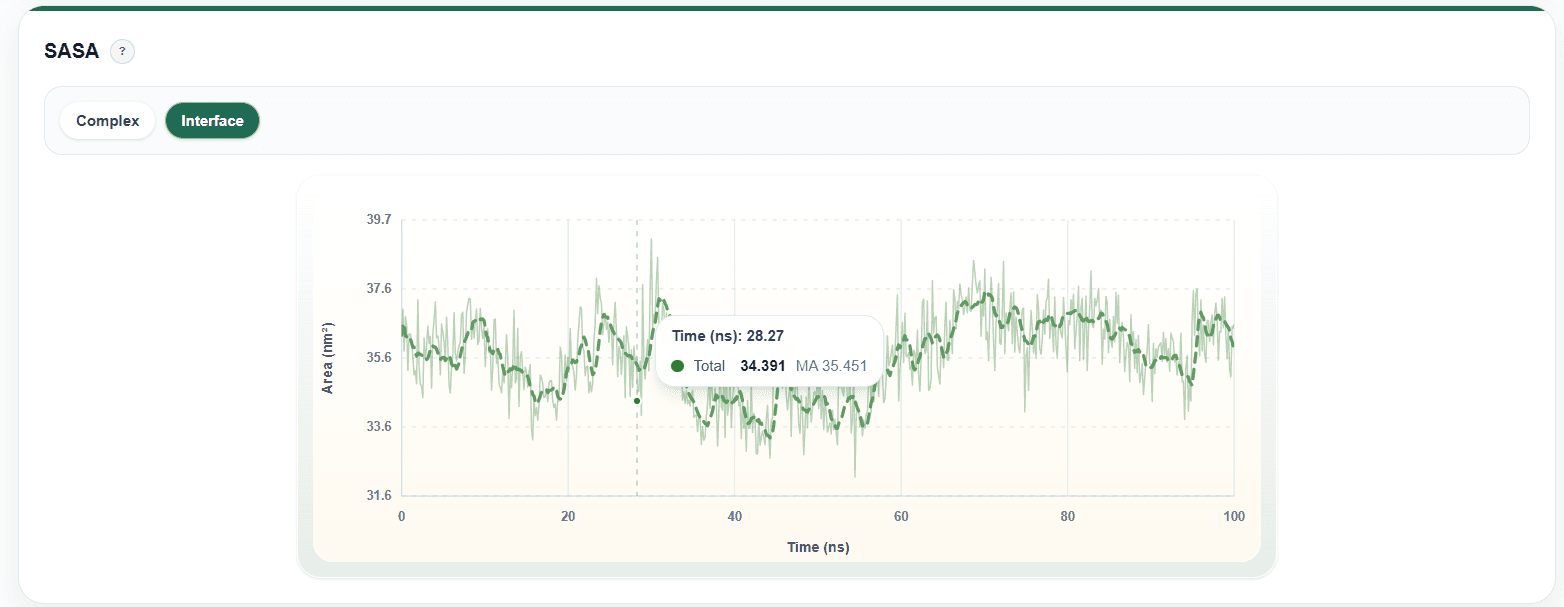
3.4.3 Interface SASA (i-SASA)
i-SASA describes changes in interface solvent-accessible surface area over time.
Instructions
Inspect the trend of the curve over simulation time.
Hover over the curve to view the i-SASA value at a specific time point.
Use the zoom tool to inspect local fluctuation regions.
Interpretation
A relatively stable i-SASA usually indicates that the degree of interface exposure remains stable.
A marked increase may suggest reduced interfacial contacts or local loosening of the complex.
A marked decrease may suggest tighter interface binding or formation of a larger buried surface area.
It is recommended to analyze i-SASA together with i-RMSD, contact frequency, and binding-energy results.
Figure 16. Interface SASA module for solvent-accessible surface area changes.
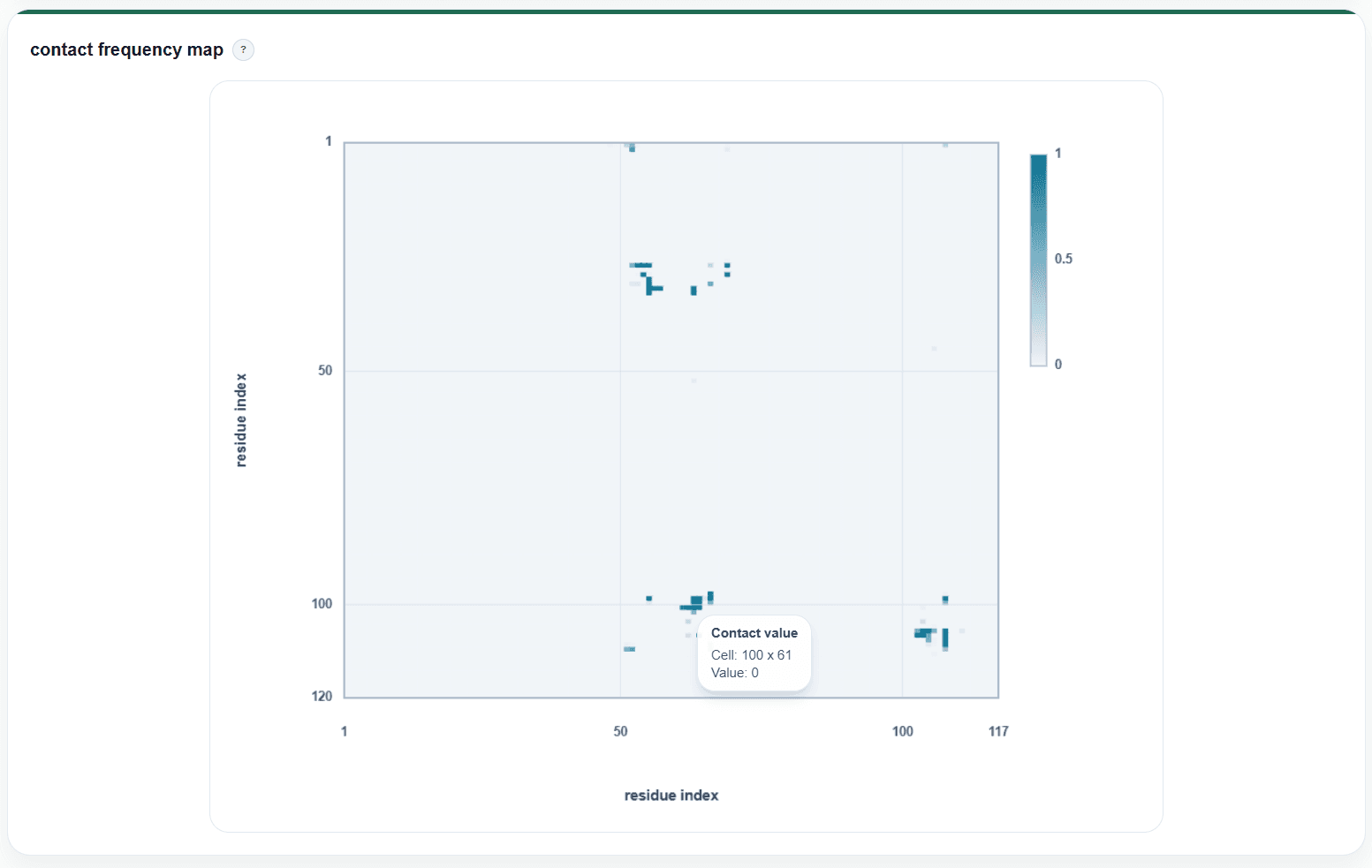
3.4.4 Contact Frequency Map
The contact frequency map shows the stability of contacts between interfacial residue pairs during the simulation.
Instructions
The x-axis and y-axis represent residues from the two sides of the complex interface, respectively.
Dots in the plot indicate the frequency with which residue-pair contacts occur.
Hover over elements in the plot to view the corresponding residue pair and contact frequency.
Interpretation
High-frequency residue-pair contacts are usually key sites that maintain the complex interface.
Low-frequency contacts may represent transient interactions or flexible regions.
Figure 17. Contact frequency map for interfacial residue-pair contact stability.
3.5 Energy Landscape and Binding Energetics
This section evaluates binding stability, energy changes, and major conformational states of the complex.
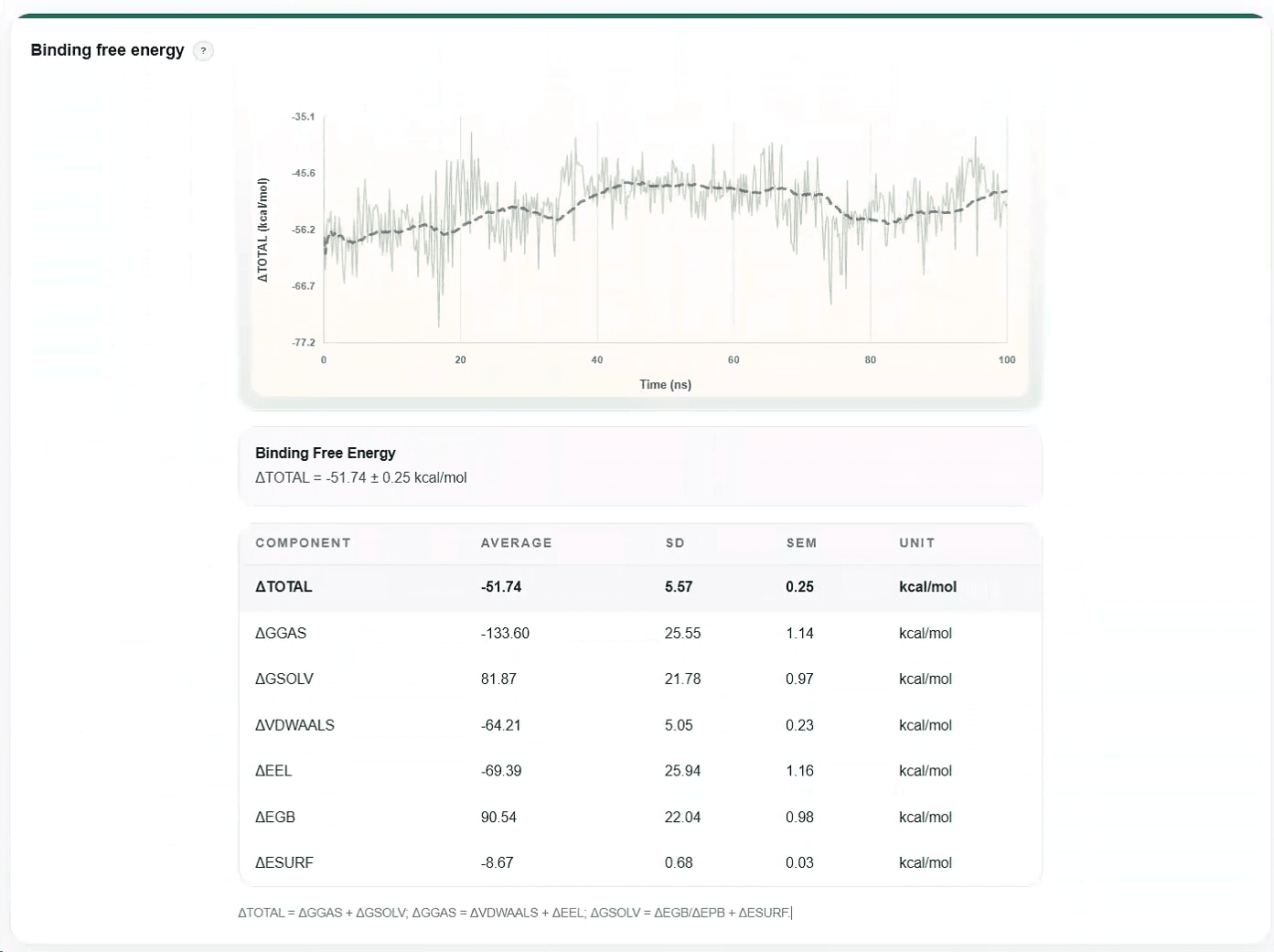
3.5.1 MM/PBSA Binding Energy
The MM/PBSA module presents binding free energy and related statistical results during the simulation.
Instructions
Inspect the curve showing binding free energy over time.
Use the statistical table to view the mean, standard deviation, and individual energy components.
Use chart zooming to examine energy fluctuations over a selected time window.
Interpretation
Lower binding free energy generally suggests a more favorable binding tendency for the complex.
A stable curve indicates that binding energy remains relatively stable during the simulation.
Avoid judging binding strength from a single time point only; instead, focus on the overall trend, mean value, and fluctuation range.
Figure 18. MM/PBSA Binding Energy module for binding free energy and statistics.
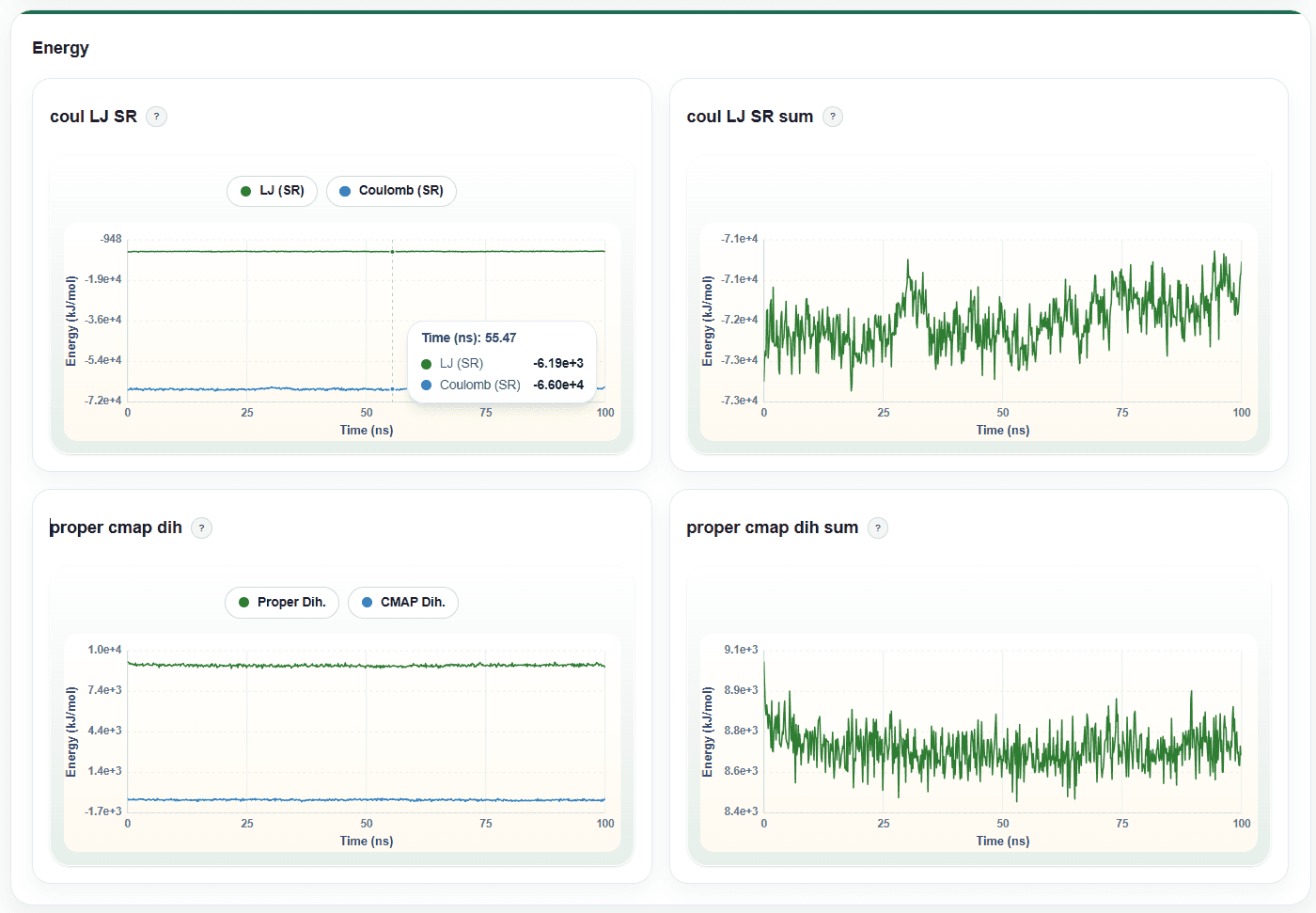
3.5.2 Energy Terms
The Energy Terms module shows time-dependent changes in system-related potential-energy terms during the molecular dynamics simulation. In addition to individual energy components, DynoDB provides two types of combined energy terms, allowing users to examine overall system trends from the perspectives of nonbonded interactions and conformation-related energies.
Each energy term is displayed as an independent line chart, allowing users to inspect individual terms and the corresponding combined energy terms separately.
The x-axis represents simulation time, and the y-axis represents the energy value.
Hover over the curve to view the exact value at the corresponding time point.
Use the chart toolbar to zoom, pan, or restore the default view, so that energy changes within a selected time window can be examined.
It is recommended to focus on the overall trend, fluctuation range, and any sustained drift in the curves during the equilibrated stage of the simulation.
Figure 19. Energy Terms module for nonbonded and dihedral-related energy trends.
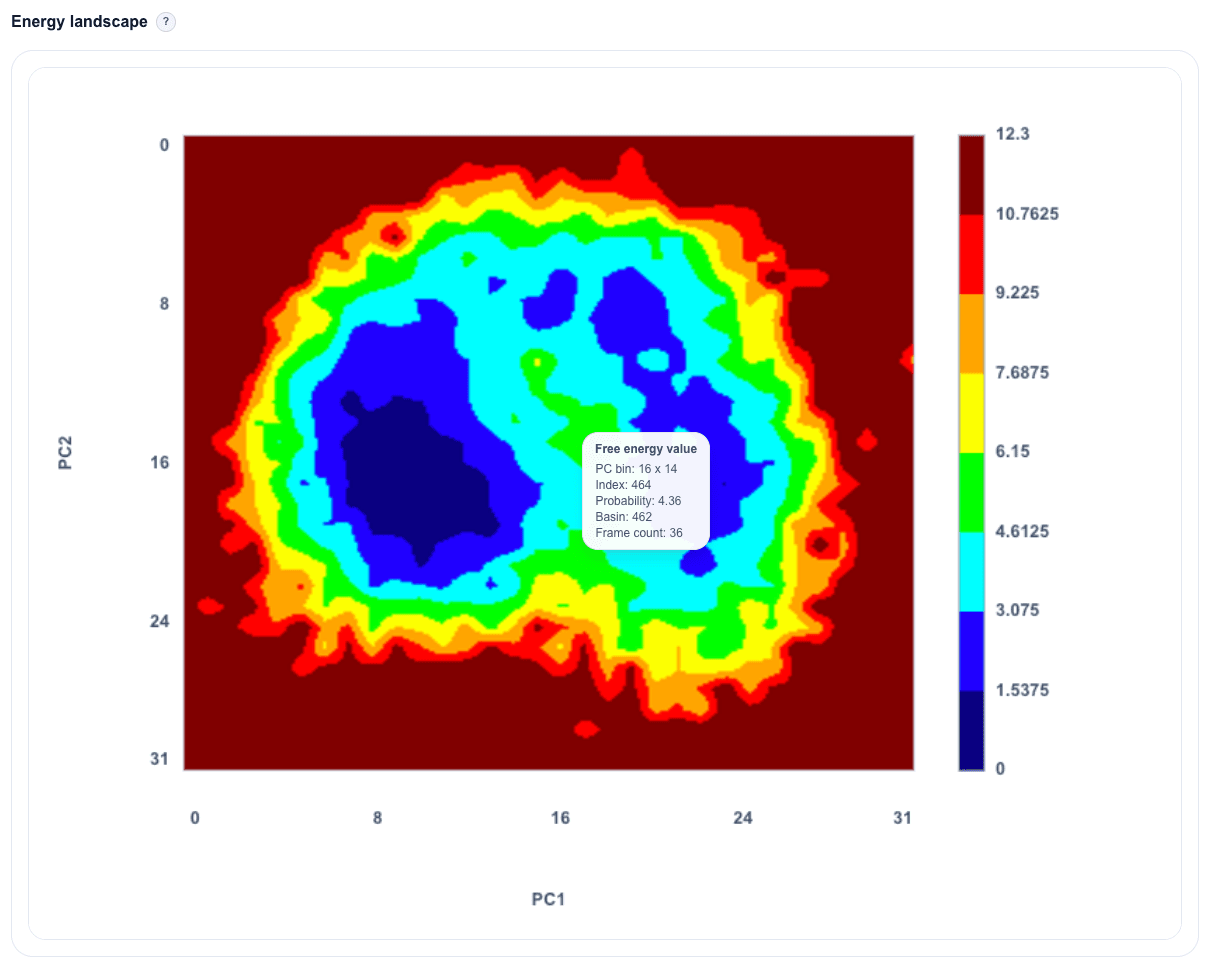
3.5.3 Free Energy Surface (FES)
The FES module uses conformational dimensionality-reduction results, such as principal component analysis (PCA), to display the major conformational distribution of the system.
Instructions
The x-axis and y-axis are usually PC1 and PC2, representing the dominant directions of conformational variation.
The color bar on the right represents free energy or conformational-distribution density.
Hover over a region in the plot to view the corresponding coordinates and relative energy information.
Interpretation
Regions with lower free energy usually correspond to more stable and more frequently sampled conformational states.
A distinct low-energy basin generally indicates the presence of a major stable conformation in the system.
Multiple low-energy basins may suggest the presence of multiple metastable conformational states.
Figure 20. Free Energy Surface module for PCA-based conformational landscapes.